Automated Call Center Reporting: Real-Time Insights That Hire Smarter, Faster
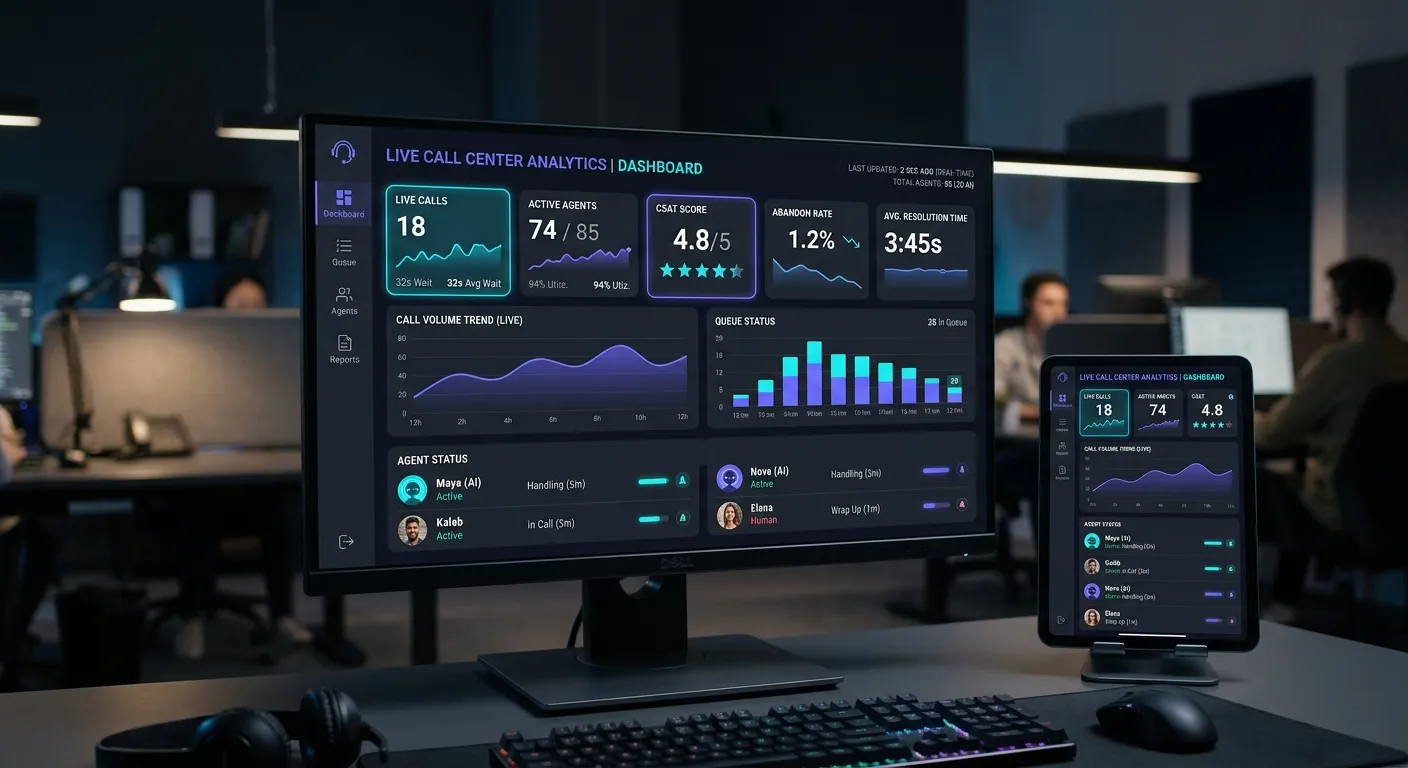
Automated call center reporting transforms raw phone data into clear, action-ready insights that help teams answer faster, coach better, and hire staff today when demand spikes. Instead of waiting for weekly spreadsheets, managers can see live queues, agent performance, customer sentiment, and staffing gaps in one dashboard. That visibility reduces missed calls, improves first-contact resolution, and supports smarter scheduling.
Live Queue Visibility
See calls waiting, average speed to answer, and overflow risk before customers abandon.
AI Call Insights
Track how often AI handles calls, escalates to humans, and resolves issues on the first attempt.
Staffing Signals
Use call volume trends to decide when to hire staff today, reduce overtime, and prevent burnout.
Why Automated Call Center Reporting Matters
Manual reporting is slow, error-prone, and often arrives after the moment has passed. Automated call center reporting captures every interaction, normalizes data, and turns it into trends you can act on immediately. For teams using automated phone answering services, reporting is the feedback loop that shows whether AI handoffs, scripts, and routing rules are working.
- Identify peak call windows before burnout happens.
- Measure whether AI containment reduces human workload without hurting satisfaction.
- Spot recurring customer issues and improve training materials.
- Align hiring decisions with real demand, not guesses.
Pro Tip: Start with five core metrics—average handle time, abandonment rate, first-contact resolution, occupancy, and customer satisfaction. Once those are reliable, expand into sentiment, reason codes, and AI escalation quality.
Key Views for Better Decisions
A modern dashboard should show real-time and historical performance side by side. Managers need to see call volume by hour, agent occupancy, AI containment rate, and service-level targets in one view.
For example, a property team using property management answering services can track emergency maintenance calls separately from leasing inquiries.
Alerts should move beyond email notifications. Configure real-time warnings for abandoned call spikes, service-level breaches, and AI escalation surges.
The right alert helps supervisors intervene before customers leave and before staffing gaps become hiring emergencies.
Call data reveals where labor is too thin. If Monday mornings consistently exceed capacity, you can hire staff today for that window instead of adding permanent headcount everywhere.
Combine reporting with AI receptionist tools to cover overflow while human agents handle complex conversations.
See Automated Call Center Reporting in Action
Watch how AI call centers convert conversations into structured data, then use those insights to improve routing, staffing, and customer experience.
How AI Improves Reporting Accuracy
Modern AI adds depth to automated call center reporting by transcribing calls, tagging intents, detecting sentiment, and summarizing outcomes. This turns voice conversations into searchable, measurable events. A healthcare team using medical after-hours answering services can review urgent versus routine calls, while a law firm can separate consultations from scheduling requests.
For example, an AI receptionist can log every interaction, identify the top reason for escalation, and flag calls that need follow-up. Managers can compare AI-handled calls with human-handled calls to find the best balance between speed and quality. With customizable call answering features, reporting becomes more aligned with your exact operational goals.
To explore the tools that support this level of visibility, read our guide to the top phone answering providers for peak efficiency.
Sentiment Tracking
Detect frustration, satisfaction, or confusion from call recordings and transcripts.
Reason Code Automation
Classify why customers call so teams can fix root causes faster.
Implementation Checklist
Use this practical roadmap to launch reliable reporting without overcomplicating your stack.
- Connect your phone system, CRM, and AI platform so every call has one record.
- Define service-level targets for each team, not one generic company-wide number.
- Create a weekly review meeting focused on trends, coaching, and hiring gaps.
- Automate reports to email, Slack, or mobile dashboards so managers act quickly.
- Measure AI containment, escalation quality, and customer satisfaction together.
Action Step: Review your current reporting gaps, then compare plans in our pricing section to find the right fit.
Common Questions About Automated Call Center Reporting
Ready to Turn Insights Into Action?
If your automated call center reporting shows missed opportunities, staffing gaps, or overloaded agents, now is the time to hire staff today and deploy smarter AI workflows. Review our pricing, explore services, learn about our approach, or contact our team.
Hire Staff Today