
Mastering Appointment Booking Service Configuration in ServiceNow: The Definitive Guide for Operational Excellence
Unlock the full potential of your ServiceNow platform by configuring a robust, intelligent appointment booking service that enhances customer experience and streamlines internal workflows.
Hire ServiceNow Configuration Experts Today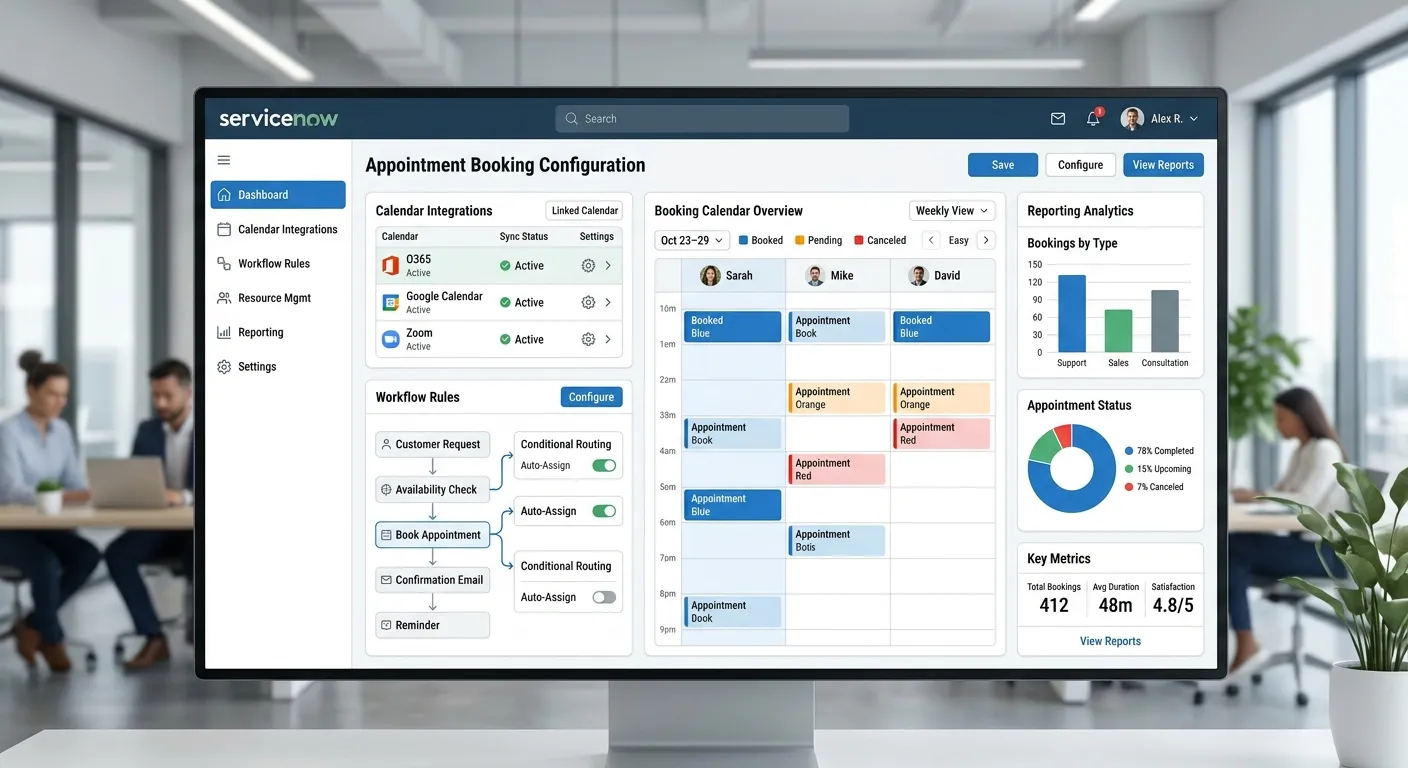
A Multi-Category Overview of ServiceNow Appointment Booking
Understanding the ServiceNow Appointment Booking Engine
The Appointment Booking Service Configuration in ServiceNow is a powerful module designed to automate and manage scheduled interactions between customers, employees, and resources. It transcends basic calendar functionality by integrating deeply with ServiceNow's CMDB, Service Catalog, and Workflow engines.
A well-configured system eliminates manual scheduling, reduces no-shows through automated reminders, and provides real-time visibility into resource utilization. For industries like healthcare, where efficient scheduling is critical, this configuration is invaluable. It directly addresses challenges highlighted in resources like our guide on Healthcare Call Volume Management, by ensuring inbound scheduling requests are handled systematically, not manually.
Pro Tip: Before configuration, thoroughly map your current appointment lifecycle. Identify all stakeholders (customers, agents, managers), triggers (new request, reschedule, cancellation), and data points (duration, resource type, location). This blueprint is essential for a successful ServiceNow Appointment Booking Service Configuration.
Step-by-Step Configuration Workflow
Configuring the Appointment Booking service is a methodological process. Begin in the ServiceNow Studio by defining your Appointment Sources (Portal, Email, API, Phone). For businesses receiving calls, integrating an AI-powered service like CallTaking.ai's AI-Powered Virtual Receptionist can automatically create appointment bookings from phone conversations, feeding data directly into ServiceNow via secure APIs.
Key configuration tables include 'Appointment Booking' (core table), 'Appointment Slot Definition', 'Resource Schedule', and 'Booking Rules'. Pay close attention to 'Booking Rules'—these are the logic engines that enforce policies like lead time, buffer periods between appointments, and resource qualifications.
- Define Resources: Configure human (staff, agents) and non-human (meeting rooms, equipment) resources with their available schedules and capacities.
- Configure Slots: Set up appointment slot definitions based on service type, linking required resources and duration.
- Set Up UI Policies & Client Scripts: Ensure the user interface dynamically updates based on selections (e.g., filtering available agents based on service type).
- Integrate Notifications: Configure outbound notifications (email, SMS) for confirmations, reminders, and follow-ups. Consider linking to AI-Powered Appointment Reminder systems for voice-based touchpoints.
Advanced Configuration for Peak Performance
Beyond basic setup, optimization is key. Implement predictive load balancing using historical booking data to anticipate high-demand periods. Configure holiday schedules and closure rules globally to maintain accuracy. Utilize ServiceNow's Flow Designer to create advanced workflows for edge cases, like automatically reassigning appointments when a primary resource calls in sick.
For businesses handling high call volumes, such as medical practices, the configuration must be resilient. Integrating with an AI-Powered Call Overflow Handling system ensures that when your ServiceNow-triggered reminders generate callback requests, they are managed efficiently without dropping leads.
Seamless Integration with Ecosystem Tools
A standalone appointment book is limited. The true power of ServiceNow configuration lies in its integrations. Use REST APIs and MID Server to connect with external calendars (Google Calendar, Office 365), CRM systems, and field service management tools. For voice-based appointment capture, a middleware layer connecting your phone system to ServiceNow is essential.
This is where modern Advanced Call Automation Software shines. These solutions can listen to a caller's intent, extract key details (date, time, service type), and use the ServiceNow API to search for availability and book the slot in real-time during the call, providing instant confirmation to the customer—a monumental leap over"leave a message" systems.
Key Benefits & Features of a Well-Configured System
24/7 Automated Scheduling
Enable customers to book appointments anytime, directly from your portal or via integrated AI phone systems. This eliminates the constraint of business hours and captures leads while you sleep, a concept explored in handling after-hours calls.
Intelligent Resource Optimization
Dynamically match appointments with the best-suited resources (staff, rooms, equipment) based on skills, availability, and location. Maximizes utilization and reduces idle time, directly impacting operational efficiency and cost savings.
Reduced No-Shows & Friction
Automated multi-channel reminders (SMS, Email, Voice) significantly decrease missed appointments. Integrate with AI for pre-appointment screening calls or post-appointment follow-ups, enhancing the patient or customer journey as seen in dental practice case studies.
Real-Time Analytics & Reporting
Gain instant insights into booking trends, resource utilization rates, peak demand periods, and customer satisfaction. Use ServiceNow Performance Analytics to create dashboards that drive data-backed decisions for staffing and service offerings.
Centralized Management & Compliance
Maintain a single system of record for all appointments, ensuring audit trails, adherence to business rules, and compliance with industry regulations (e.g., GDPR, HIPAA). This is especially critical for sectors like legal and healthcare, where secure call answering and data handling are paramount.
Omni-Channel Customer Experience
Provide a consistent booking experience whether the customer arrives via web portal, mobile app, phone call, or email. A unified ServiceNow backend ensures data sync and avoids double-booking, while front-end integrations like AI voice assistants handle the phone channel seamlessly.
Configuring for Specific Industries: Beyond the Basics
Healthcare & Medical Answering Services Jobs
The configuration for healthcare demands extreme precision. Appointment types are complex (consultation, procedure, follow-up), resources are specialized (Dr. Smith, MRI Room #2), and compliance is non-negotiable. Here, the Appointment Booking Service Configuration Servicenow must integrate with Electronic Health Records (EHR) and support telehealth flags.
Furthermore, managing Medical Answering Services Jobs often involves handling a high volume of urgent, same-day appointment requests. The system must be configured with priority queues and rules to escalate critical calls. An integrated Call Taking AI can triage these calls, gather preliminary information, and present available slots from ServiceNow in real-time, streamlining the process and reducing pressure on human staff.
Configuring reminder workflows is also crucial. Automated reminders reduce no-shows, but for sensitive healthcare appointments, the tone and channel matter. Integrating with an AI that can make personalized, conversational reminder calls (as opposed to generic SMS) can significantly improve attendance rates.
"In healthcare, a missed appointment is more than a lost revenue slot; it's a delay in care. A ServiceNow configuration that proactively manages the entire booking lifecycle—from AI-powered intake to intelligent follow-up—becomes a critical component of patient care delivery."
Field Service & On-Site Visits
For businesses like plumbing, HVAC, or IT support, the appointment booking configuration must account for travel time, parts availability, and technician skill sets. The ServiceNow Resource Schedule must integrate with maps and traffic data to provide accurate time windows.
The initial booking channel is often the phone. A caller describes a problem, and the system must guide them to the correct service catalog item and then present available slots for qualified technicians. This requires deep integration between the voice AI and ServiceNow's Service Catalog and Appointment Booking APIs. Solutions that offer industry-specific call answering are pre-configured to understand this jargon and workflow, making the technical integration smoother.
Professional Services & Consultancies
Law firms, financial advisors, and consultants deal with high-value, often lengthy appointments. Configuration focuses on lead qualification during booking, conflict checks (especially in legal), and integrating with CRM systems like Salesforce to attach the appointment to the correct opportunity or case.
The booking interface, often a client portal, needs to be branded and secure. ServiceNow's portal capabilities allow for this customization. For phone bookings, which are still prevalent, ensuring the AI or receptionist can handle nuanced scheduling requests and properly set expectations is key, a topic covered in legal intake answering guides.
Frequently Asked Questions on Appointment Booking Configuration
The absolute first step is discovery and scoping. You must document all business processes, appointment types, resources, rules, and integration points. Create a detailed requirements document. Only then should you log into ServiceNow Studio. Begin by activating the correct plugin and setting up foundational data like calendars, business hours, and closure dates.
Yes, but not natively out-of-the-box for voice calls. ServiceNow provides robust REST APIs. To handle phone calls, you need an intermediate layer—an Intelligent Voice AI system like CallTaking.ai. The AI answers the call, understands the caller's intent to book an appointment, interacts with them conversationally, and then uses the ServiceNow API to query availability and confirm the booking. This creates a seamless, voice-to-digital workflow, transforming your phone line into a 24/7 automated booking agent.
Scale and Complexity: A small business might have 2-3 resources and simple rules. Configuration is straightforward. A large enterprise may have hundreds of resources across global locations, complex approval matrices, and integrations with multiple legacy systems. The configuration requires meticulous planning, likely using a phased rollout.
Integration Scope: Small businesses might use standalone web booking. Enterprises need deep CRM, ERP, and telephony integrations.
Compliance & Security: Enterprise configurations require stricter access controls, audit logging, and compliance with corporate IT policies.
- Neglecting Time Zones: For global businesses, failing to configure time zone support for resources and customers leads to major booking errors.
- Overly Complex Rules: Creating too many interdependent booking rules can make the system unpredictable and difficult to troubleshoot. Start simple.
- Ignoring the User Experience: Configuring a powerful backend but providing a clunky portal or phone interface defeats the purpose. The front-end must be intuitive.
- Forgetting Change Management: Not training staff and customers on the new system leads to low adoption and failure. Communicate the benefits and provide clear guides.
Build with modularity in mind. Use variables for business rules instead of hard-coded values. Document every configuration decision thoroughly. Leverage ServiceNow's Update Sets to manage and promote changes systematically across instances. Most importantly, choose integration partners (like for telephony) that offer powerful and seamless integrations and are committed to keeping their API connectors updated with the latest ServiceNow releases. This future-proofs your investment.
Ready to Transform Your Appointment Booking Operations?
A masterfully configured ServiceNow Appointment Booking system, combined with intelligent call handling, can become your most powerful tool for customer satisfaction and operational efficiency. Whether you're looking to implement, optimize, or integrate your system, having the right expertise is critical.
Advanced Configuration Scenarios & Proactive Troubleshooting
Moving beyond foundational setup, seasoned administrators must prepare for edge cases and system stress points. A robust Appointment Booking Service Configuration Servicenow is defined not by how it handles perfect scenarios, but by its resilience during exceptions.
Scenario: The Cascading Cancellation
A key resource (e.g., a specialist doctor) cancels their day. A basic system would leave dozens of customers with invalid appointments. An advanced configuration uses Event-Driven Automation in Flow Designer.
- Trigger: Resource status changed to"Unavailable".
- Action 1: Query all future appointments for that resource.
- Action 2: Apply business logic: Can another qualified resource take them? If yes, auto-reassign and notify. If no, trigger a multi-step customer notification workflow offering reschedule options via a personalized link.
- Outcome: Operational chaos is transformed into a managed, customer-centric recovery process.
Scenario: Dynamic Buffer Time Configuration
Static buffer times between appointments can waste capacity. Advanced configuration ties buffer logic to ServiceNow Performance Analytics.
For example, if historical data shows"Procedure X" with Dr. Lee consistently runs 15 minutes over, the system can automatically adjust future slots for that specific service-resource combination. This is configured using a scheduled job that analyzes completed appointment durations against estimates and updates the 'Booking Rules' table accordingly.
Proactive Monitoring & Health Checks
Configuration is not a"set and forget" task. Implement these proactive checks to prevent system degradation:
- Slot Integrity Monitor: Create a scheduled script that runs nightly to detect and flag"orphaned slots" (slots defined but not attached to any active resource schedule) or overlapping slot definitions, which are a primary cause of double-booking errors.
- API Integration Heartbeat: For critical integrations like telephony AI or EHR systems, configure a daily test transaction that verifies the connection is alive and data is flowing correctly. Log failures to an operational dashboard.
- Booking Rule Audit: Complex rule sets can conflict. Quarterly, export your booking rules and analyze them for contradictions (e.g., Rule A blocks bookings under 24h, Rule B allows same-day for priority customers). Use a spreadsheet or dedicated rule analysis tool to visualize logic flows.
Critical Note on Upgrades: ServiceNow platform upgrades can sometimes reset or deprecate certain OOB configurations. Before any upgrade, use the ‘Compare’ functionality in Update Sets to see how your custom Appointment Booking configurations will be affected. Always test the full booking lifecycle in a sub-production instance first.
Case Study: Regional Healthcare Network
Challenge & Solution
A network of 12 clinics was using a mix of paper books, standalone software, and a overwhelmed central phone line. No-shows averaged 18%, and patient wait times for a booking call exceeded 8 minutes.
The solution was a centralized ServiceNow Appointment Booking Service Configuration with a dual-frontend:
- A unified patient portal for online booking, configured with intelligent forms that asked specialty-specific pre-screening questions, routing patients to the correct clinic and resource type.
- Full integration with CallTaking.ai to handle the phone channel. The AI was trained on medical terminology, could perform basic triage, and interacted with the ServiceNow API in real-time to find slots, reducing call handling time by 70%.
Quantifiable Outcomes (6 Months Post-Implementation):
12%
Reduction in No-Shows
92%
Patient Satisfaction (Booking Process)
15%
Increase in Resource Utilization
24/7
Booking Availability Achieved
Key Configuration Takeaway
"The success hinged on configuring a single source of truth for availability in ServiceNow, then building multiple, optimized access channels (Portal, AI Phone) to it. This prevented data silos and ensured consistency, whether the patient booked online or by phone."
The Next Frontier: Predictive & AI-Enhanced Booking
The future of Appointment Booking Service Configuration Servicenow lies in moving from reactive scheduling to predictive orchestration. This involves leveraging ServiceNow's AI capabilities and external data feeds.
1. Predictive Demand Forecasting
Using ServiceNow's Predictive Intelligence, you can train models on historical booking data, seasonal trends, and even external events (e.g., local conferences, weather patterns for HVAC services). The system can then proactively suggest adjusting resource schedules or opening additional slots before demand spikes, ensuring capacity meets need.
Configuration involves setting up data sources, defining the prediction outcome (e.g.,"Appointments for Service X next Tuesday"), and creating workflows that act on the predictions, such as sending alerts to managers or temporarily modifying slot definitions.
2. Conversational AI & Natural Language Booking
While current integrations pass structured data, the next step is enabling true conversational discovery. Imagine a patient messaging,"I need to see someone about my knee pain next week in the afternoon." An advanced AI layer would:
- Parse the intent and entities (body part: knee, symptom: pain, timeframe: next week afternoon).
- Query ServiceNow's CMDB to find the correct service item (e.g.,"Orthopedic Consultation").
- Use the Appointment Booking API to find available slots matching all criteria.
- Present options conversationally:"Dr. Chen has a slot Thursday at 2 PM. Would that work?"
This requires configuring more nuanced API endpoints and potentially using ServiceNow's NLU capabilities or a partnered AI platform with deep two-way integration.
Your Configuration Roadmap
To prepare for this future, ensure your current configuration is built on a clean, well-documented data model. Avoid customizations that break OOB APIs. Prioritize integrations that use open standards (REST, OAuth). As ServiceNow releases new AI-driven features for the Appointment Booking module, a clean foundation will allow you to adopt them rapidly, turning your scheduling engine from a utility into a competitive intelligence asset.